
When you activate a new line, your SIM card is already activated and ready to use. Insert it into your device to get connected.
If you’re bringing your number from another service provider, you’ll need to take a few more steps to get set up.
The ICCID is the identification number of your SIM card. It’s a unique 20-digit number printed on your SIM card that starts with 89302.
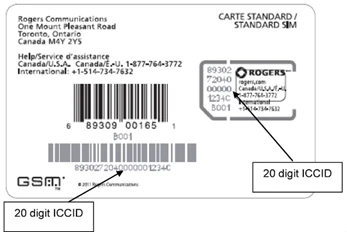
You can also find your SIM card number in your device settings:
iOS:
Android:
It’s best to turn off your phone and take the SIM card out. You’ll see the SIM card number on the card itself as most Android devices don’t have a way to find the SIM card number using the phone’s settings.
When you activate a new line, your SIM card is already activated and ready to use. Insert it into your device to get connected.
If you’re bringing your number from another service provider, you’ll need to take a few more steps to get set up.
The ICCID is the identification number of your SIM card. It’s a unique 20-digit number printed on your SIM card that starts with 89302.
You can also find your SIM card number in your device settings:
iOS:
Android:
It’s best to turn off your phone and take the SIM card out. You’ll see the SIM card number on the card itself as most Android devices don’t have a way to find the SIM card number using the phone’s settings.